Release notes · SwingCoach 1.2.1 for iPhone
Kettlebell swing challenge app: SwingCoach 1.2.1
SwingCoach 1.2.1 adds daily swing challenges. You pick a number of swings a day, and the app counts each day. The update also improves rep counting, rep review and the Apple Watch app.
 Abdelrahman Eita · · 4 min read
A kettlebell swing challenge gives you a simple goal for each day. SwingCoach 1.2.1, out on 19 November 2026, adds this to the app. SwingCoach is a kettlebell workout app for iPhone: the camera counts your swings, and the optional Apple Watch app shows your progress. This update also improves the kettlebell rep counter and the rep review.
Daily swing challenges
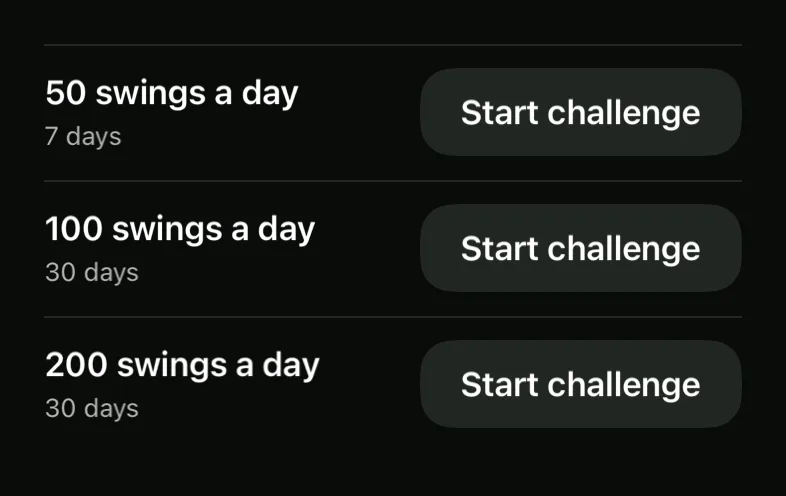
The Train screen has a new row called Challenges. Tap it to see three kettlebell swing challenges.
- 50 swings a day for 7 days.
- 100 swings a day for 30 days.
- 200 swings a day for 30 days.
Tap Start challenge next to the one you want. You can do the swings in one workout or in many workouts.
How a challenge works
- Open Train and tap Challenges.
- Tap Start challenge on a challenge.
- Do your workouts. The camera counts your swings, as always.
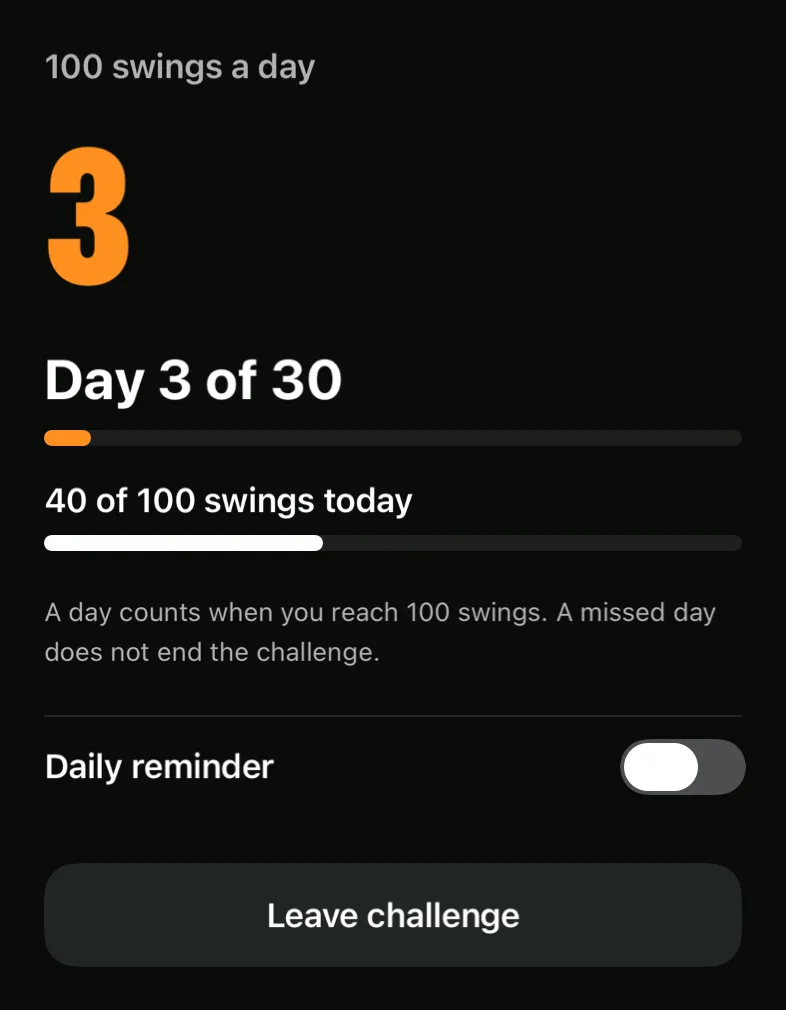
- Open Challenges again. The screen shows "Day 3 of 30" and your swings today, for example "40 of 100 swings today".
A day counts when your saved workouts for that day reach the daily number. The workouts of one day add up. The day you start counts in full, so a workout that you did earlier that day is in the challenge. A missed day does not end the challenge. The challenge is complete after the days that you counted. When it is complete, tap Choose a new challenge. To stop early, tap Leave challenge.
The Train row shows the same information in one line, so you can see the day and your swings today before you start.
A daily reminder
A day can pass with no swings. To help with this, the Challenges screen has a Daily reminder toggle. Turn it on and choose a time. SwingCoach plans a notification for each of the next seven days. After each workout it plans again, so a day that already has its swings gets no reminder. iOS can also show the notification on a paired Apple Watch while your iPhone is locked.
If you did not allow notifications, the app tells you to turn them on in Settings.
Better rep counting and rep review
A kettlebell rep counter must count what you swing and nothing else. This update fixes four things.
- No rep for a parked bell. If you put the bell down and stand up, the app now counts no rep. A swing needs a lift of the bell.
- One-arm swings. The app follows the hand that holds the bell, so it counts a swing with your far hand. The arm cue also comes from the arm that holds the bell.
- The photo at the top. The rep photo now shows the bell at its highest point, also in low light.
- Cues and numbers agree. The knee and elbow angles in the rep review are the ones that the cue used. The lean at the top shows its degrees and its limit.
The review has more data too. A saved workout keeps the poses of up to 60 reps. It keeps photos for 12 reps: the first, the last, the reps with a cue, and reps from the rest of the set. In workout details, each finding shows how many reps had it, for example "15 of 22 reps leaned back at the top." In Settings, you can delete the rep photos of workouts older than 10 days. Your workouts and stats stay.
Apple Watch
The Apple Watch app is optional, and it works as an Apple Watch kettlebell remote. The iPhone camera still does the counting. This update adds three things.
- When no workout runs, the Watch shows your swings today and your challenge, for example "Day 3 of 30 · 60 to go".
- When the camera check opens on your iPhone, the iPhone asks the Watch to open SwingCoach. You do not need to find the app on your wrist.
- The Watch clock stops while the End dialog is open. The time on the Watch now matches the iPhone.
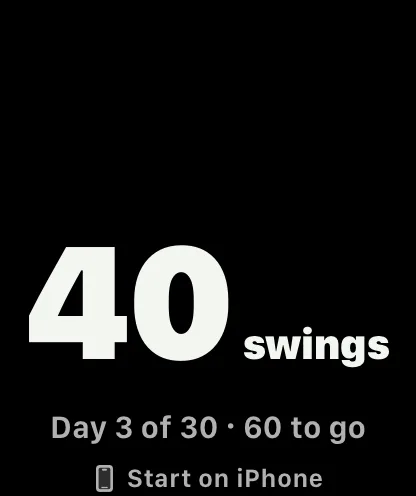
A workout still starts on the iPhone. The SwingCoach 1.1 release notes describe the Watch screens for a workout.
Questions
What is a kettlebell swing challenge in SwingCoach? You pick a number of swings a day for a number of days. A day counts when your saved workouts reach the daily number.
What if I miss a day? The challenge does not end. It is complete after the days that you counted.
Can I get a reminder? Yes. Turn on Daily reminder on the Challenges screen and choose a time.
Does the Apple Watch show my challenge? Yes. With no workout running, the Watch shows your swings today and the day of the challenge.
The story so far
Version 1.2 made the app dark and hands-free. It added the hands-free end and a huge rep count. The 1.2 post has the details. Version 1.1 added the hands-free start and spoken cues, as the 1.1 post describes.
Get the update
Update or download SwingCoach on the App Store. Pose analysis runs on your iPhone, and no video is uploaded. The privacy policy has the details. SwingCoach gives movement estimates from a 2D side view. It is not a medical assessment. Train within your ability and clear the space around you before you swing. If the count is wrong, write to me through SwingCoach support.