Developer tools · macOS
Keep your Mac awake while Claude Code or Codex runs overnight
You start a long AI agent task in Claude Code or Codex, go to bed, and in the morning it did ten minutes of work. Here is why, and three ways to stop it.

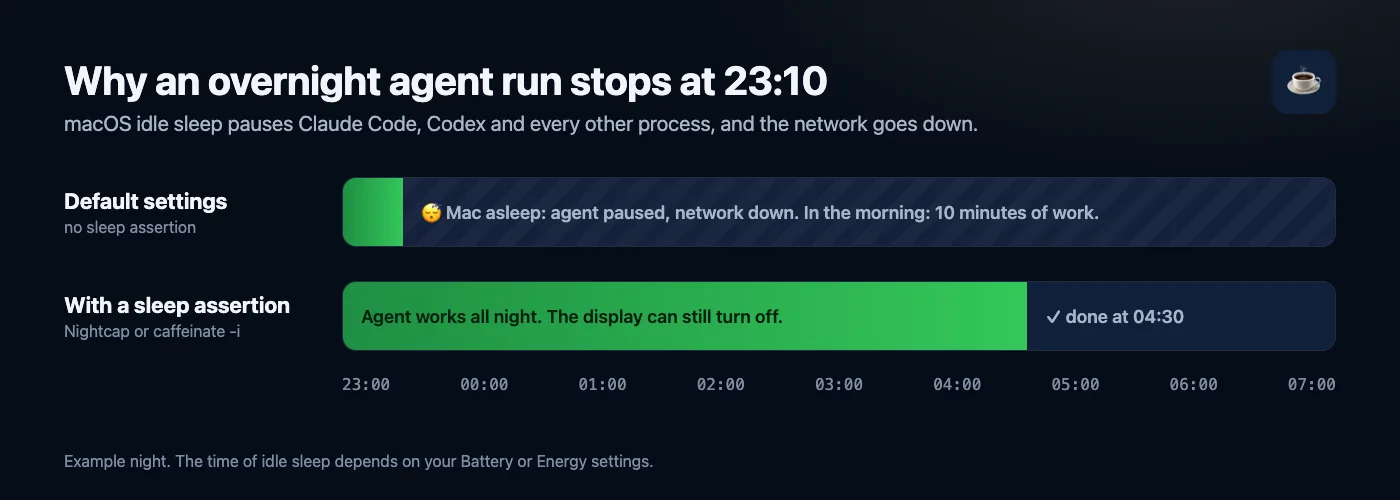
Short answer. For one terminal session, start the agent with caffeinate -i claude (or caffeinate -i codex). If you use the Codex or Claude desktop apps, or many terminal tabs, use Nightcap Awake: it keeps the Mac awake while the apps you pick run. Connect power. Do not close the lid, except in Apple's closed-display mode.
Why AI agents stop when the Mac sleeps
When nobody touches the Mac, macOS turns off the display, and then the system goes to idle sleep. In sleep, the CPU stops every process. Claude Code, Codex, a build and a download all pause. The network connection also goes down, so a request to the model that was open at that time can fail.
A locked screen or a screen saver does not cause this. Only sleep does. To stop idle sleep, a program creates a power assertion. This is a request to macOS that says "do not idle sleep now". The first two ways below make this request. The third way changes a macOS setting.
Way 1: the caffeinate command
caffeinate is built into macOS, in /usr/bin. The man page says that when you give it a command, it holds the assertion "for the duration of the utility's execution". So start the agent with it:
caffeinate -i claude      # Claude Code
caffeinate -i codex       # Codex CLI
When the agent exits, caffeinate exits too, and normal sleep comes back. If the agent already runs, open a new tab and run caffeinate -i with no command. It holds the assertion until you press Control-C. To stop when a process ends, give its ID: caffeinate -i -w <pid>.
| Flag | What it blocks | Use it for an agent? |
|---|---|---|
-i | Idle system sleep. This is the default when you give no flag. | Yes. This is the one you need. |
-s | System sleep. Valid only on AC power. | Optional, with -i. |
-d | Display sleep. | No. The display can turn off. |
-m | Disk idle sleep. | Usually not needed. |
-u | Declares that a user is active. It turns the display on. Default timeout of 5 seconds. | No. |
-t <sec> | Releases the assertion after a timeout. Ignored when you give a command. | Only for a fixed time. |
-w <pid> | Releases the assertion when that process exits. | Yes, for an agent that already runs. |
Many guides copy caffeinate -dimsu. It keeps the display on all night too. For an agent, -i is enough.
Limits. You must remember it before each run. If you close the terminal tab, caffeinate ends. It does not help the Codex or Claude desktop apps, because they do not start from a terminal.
Way 2: Nightcap Awake, by app
Nightcap Awake is my free menu bar app for this job. You pick apps once. While one of them runs, Nightcap holds the same idle-sleep assertion as caffeinate -i. When the last watched app quits, Nightcap releases it.
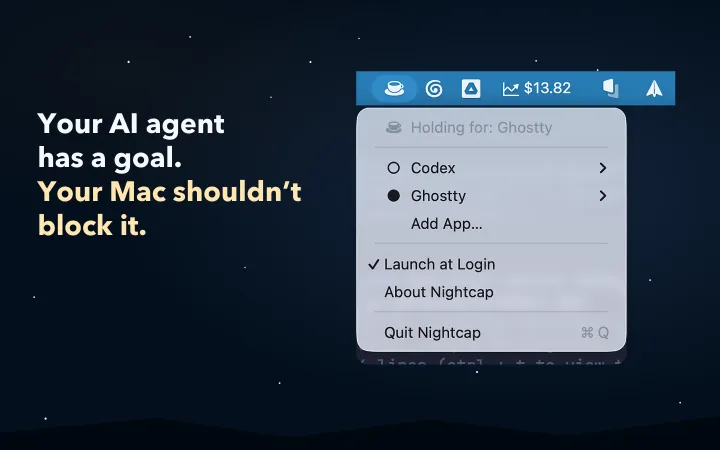
- Install it from the Mac App Store, or run
brew install --cask Abdo-codes/tap/nightcap. - Click the cup in the menu bar and choose Add App….
- Add the app that runs the agent. Nightcap watches Ghostty by default. For Claude Code or the Codex CLI in another terminal, add Terminal or iTerm. For the desktop apps, add Codex or Claude.
- Turn on Launch at Login. Nightcap then works after each restart.
Know this before you use it. Nightcap watches apps, not one command. If your terminal stays open after the agent finishes, the Mac stays awake until you quit the terminal. To keep the terminal open and allow sleep, pause it in the Nightcap menu. Nightcap does not keep the display on, and it does not work with the lid closed. It is sandboxed, has no analytics and no network access, and needs macOS 14 or later. The source is on GitHub under the MIT license.
Way 3: a System Settings switch
macOS has a setting that stops sleep when the display is off. On a MacBook, open System Settings, Battery, Options and turn on "Prevent automatic sleeping on power adapter when the display is off". On a desktop Mac, the setting is in Energy. Apple describes it in Set sleep and wake settings for your Mac.
This is the simplest way, but it is on all the time while the Mac has power. Apple says that it can increase power use. If the extra power use is acceptable to you, it is a good choice for a desktop Mac that runs agents every night.
Can I keep a MacBook awake with the lid closed?
Not with caffeinate, Nightcap or the setting above. A MacBook sleeps when you close the lid, even with an idle-sleep assertion. There are two ways that work:
- Closed-display mode. Connect power, an external display, and an external keyboard or mouse. Then close the lid. Apple explains it in Connect displays to your Mac. On Apple silicon, allow the accessories to connect first, in Privacy & Security.
- Amphetamine with its helper. Amphetamine offers closed-lid sessions with a separate download. See my Nightcap Awake vs Amphetamine comparison for the details.
Do not put a running MacBook in a bag. With sleep blocked, it gets hot.
Check what keeps your Mac awake
Before you go to bed, check that the assertion is there. pmset shows every process that blocks sleep:
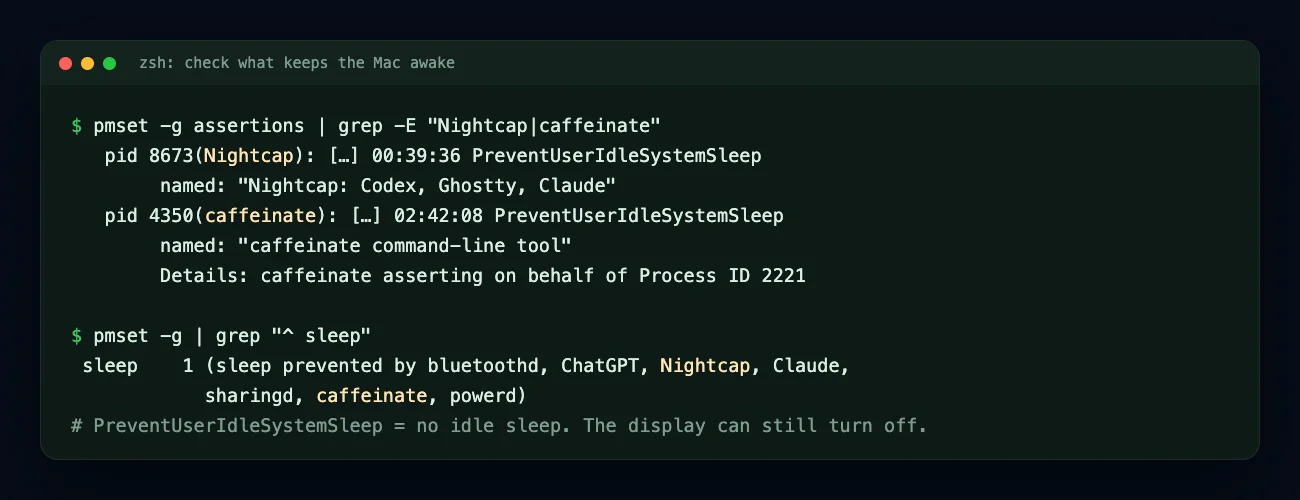
pmset -g assertions | grep -E "Nightcap|caffeinate"
pmset -g | grep "^ sleep"
In the first result, look for PreventUserIdleSystemSleep next to Nightcap or caffeinate. In the second result, check that Nightcap or caffeinate is in the "sleep prevented by" list. System processes can also be in that list, so do not use them as proof. The System Settings switch is a setting, not an assertion, so it does not show here.
Which way to use
| Way | Best for | Stops by itself | Lid closed |
|---|---|---|---|
caffeinate -i claude | One terminal session that you start yourself | Yes, when the agent exits | No |
| Nightcap Awake | Desktop apps, many tabs, and people who forget caffeinate | Yes, when the watched apps quit | No |
| System Settings switch | A desktop Mac that runs agents every night | No, it is always on | No |
| Amphetamine | Schedules, triggers and closed-lid sessions | Yes, with triggers | Yes, with its helper |
Other things that stop a night run
Sleep is the most common cause, but it is not the only one.
- An approval prompt. The agent waits for you to allow a command or a file edit. Set the permissions for the task before you leave.
- The battery. A blocked sleep on battery empties it. Connect power.
- Updates. A macOS update can restart the Mac at night. Check Software Update before a long run.
- A full disk. Builds stop when the disk is full. My DerivedData guide shows what is safe to delete.
Questions
Does Claude Code keep running when my Mac sleeps? No. System sleep pauses every process, and the network connection goes down. The agent continues only after the Mac wakes, and a request that was open at that time can fail.
What is the caffeinate command for Claude Code? Run caffeinate -i claude. caffeinate starts Claude Code and blocks idle system sleep until Claude Code exits. Use caffeinate -i codex for the Codex CLI.
Can my Mac sleep the display and keep the agent running? Yes. caffeinate -i and Nightcap Awake block idle system sleep only. The display turns off on its normal schedule, and the agent keeps running.
Can I keep a MacBook awake with the lid closed? Not with caffeinate -i or Nightcap Awake. A MacBook sleeps when you close the lid. Apple's closed-display mode keeps it awake with the lid closed when it has power, an external display, and an external keyboard or mouse. Amphetamine also offers closed-lid sessions with its helper.
Does a locked screen stop the agent? No. A locked screen or a screen saver does not stop processes. Only sleep does.
Is Nightcap Awake free? Yes. Nightcap Awake is free on the Mac App Store, with no account, no ads and no in-app purchases. It is open source under the MIT license and needs macOS 14 or later.