Release notes · Hona Elqahra for iPhone
Quran radio widget for iPhone: Hona Elqahra 1.1 adds Siri and reciter search
Play Cairo Quran Radio from your Home Screen, ask Siri to tune in, and find Al-Husary in Warsh with any spelling. Here is what is new, and how to use it.

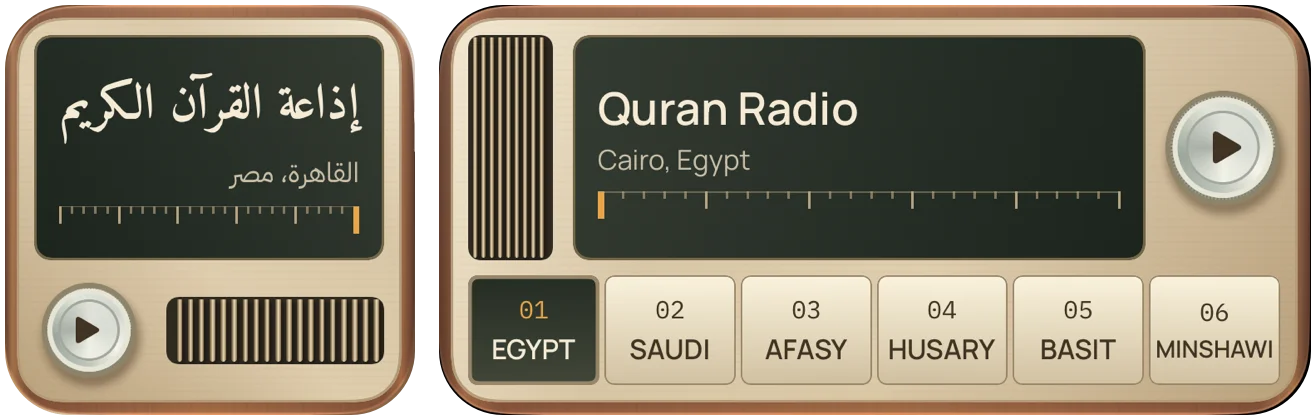
Hona Elqahra is a free Quran radio app for iPhone. It looks and feels like a classic radio: one knob, six presets, and Cairo Quran Radio on preset 1. Version 1.1 takes that radio out of the app. You can now play your stations from the Home Screen, ask Siri to tune in, and find a reciter in the spelling you know.
I sent 1.1 to Apple for review on 19 November. When Apple approves it, the update will come to you from the App Store.
Quran radio widgets for the Home Screen
The widget is called Preset radio, and it comes in two sizes:
- Small: one station and one round button. Tap it to play, tap it again to pause. Good if you always come back to Cairo Quran Radio.
- Wide: a green tuning display and six numbered preset keys. Tap a key to change the station. The display shows the station that plays now, or the last one you played.
To add it:
- Touch and hold an empty area of the Home Screen, then tap Edit and Add Widget.
- Search for Hona Elqahra and choose the small or the wide radio.
- To pin one station to a widget, touch and hold the widget and tap Edit Widget. A pinned widget always shows that station.
Choose your six dial presets
The six preset keys on the wide widget are the same six positions as the dial in the app. Change them once, and both update.
- Open Stations and tap Edit dial presets.
- Tap a position from 1 to 6.
- Pick a station from your Favorites, or search all 170+ stations.
If the station you pick is already on the dial, the two positions swap. You never get the same station twice.
Play Quran radio with Siri and Shortcuts
Say “Play a station on Hona Elqahra”, and Siri asks which station you want. Say “Pause Hona Elqahra” to stop.
The Shortcuts app has two new actions: Play radio station and Pause radio. Add them to your own shortcut and choose the station in advance. Then one tap, or one sentence to Siri, starts that station.
Search reciters and readings in Arabic or English
Reciter names have many English spellings. In 1.1, Stations search knows the common ones:
- Al-Husary: Husary, Hussary, Hosary, El Hosary
- Abdul Basit: Abdul Basit, Abdelbaset, Abd El Baset
- Al-Minshawi: Minshawi, Menshawy, Manshawi
- Mishary Alafasy: Alafasy, Afasy, Mishari, Meshary
Arabic search ignores tashkeel and the different forms of alif, so احمد also finds أحمد.
You can also search by reading: Warsh, Qalun, Khalaf, As-Susi, Ad-Duri, Ibn Dhakwan, Al-Asbahani, Al-Bazzi, or Mujawwad. Each word you type narrows the list. Type Hosary Warsh or الحصري ورش, and you get Al-Husary in the Warsh reading. Save it to Favorites, or put it on the dial.
To see these changes again in the app, open About and tap What’s New.
Questions
Can I put a Quran radio widget on my iPhone Home Screen? Yes. Hona Elqahra 1.1 has a small widget for one station and a wide widget with six preset stations.
Can Siri play Quran radio? Yes. Say “Play a station on Hona Elqahra”, and Siri asks which station to play.
Is Hona Elqahra free? Yes. It is free on the App Store for iPhone with iOS 18 or later, with no account.
Can I listen to Quran radio on Apple TV? Yes, with Sajdah. Quran radio is part of Sajdah Premium.
ما الجديد في الإصدار 1.1
- الراديو على شاشتك الرئيسية: شغّل محطة بالأداة الصغيرة، أو تنقّل بين محطاتك الست بالأداة العريضة.
- اختر محطاتك الست: من «الإذاعات»، اضغط على «تعديل محطات القرص». اختر لكل زر محطة من المفضلة أو الدليل.
- استمع مع Siri: قل «شغّل محطة على هنا القاهرة»، أو استخدم التشغيل والإيقاف المؤقت في تطبيق «الاختصارات».
- ابحث باسم القارئ أو الرواية: ابحث بالعربية أو الإنجليزية. جرّب «الحصري ورش» لتجد تلاوة الحصري برواية ورش.
اقرأ قصة التصميم على صفحة هنا القاهرة.
Get Hona Elqahra
Read how the first version took shape. If a station stops or something feels wrong, email me at abdulrhman.eaita@gmail.com.